Today, many developers utilize numerous fonts from all over the web to deliver a unique user interface for their clients. For example, developers use Google Fonts, a free, open-source library of fonts available for personal and commercial use. However, custom fonts and large icon libraries provide a potential performance degradation and slower first-paint time.
The issue
Here are some common ways developers insert fonts into their website:
<head>
  ...
  <!--Linking to a render-blocking resource into the webpage-->
  <link href="https://fonts.googleapis.com/css2?family=Josefin+Sans:wght@100&display=swap" rel="stylesheet">
</head>
body {
     /* and using in CSS */
     font-family: 'Josefin Sans', sans-serif;
}
In this example, the webpage must create an additional cross-origin network request to obtain the CSS file from Google’s font service. This network request adds multiple seconds to the render time for users with a poor connection.
Additionally, some CSS files make more than one network request to serve the exact font file requested. For this example, one more network request is made to obtain the font file:
@font-face {
  font-family: 'Josefin Sans';
  font-style: normal;
  font-weight: 100;
  font-display: swap;
  src: url(https://fonts.gstatic.com/s/josefinsans/v17/Qw3PZQNVED7rKGKxtqIqX5E-AVSJrOCfjY46_DjRbMhhKSbpUVzEEaq2.woff) format('woff');
  unicode-range: U+0100-024F, U+0259, U+1E00-1EFF, U+2020, U+20A0-20AB, U+20AD-20CF, U+2113, U+2C60-2C7F, U+A720-A7FF;
}
Furthermore, depending on the font service, you may load additional CSS files for your fonts. This creates numerous render-blocking resources and a poor user experience for those with a poor connection.
Learn more about render-blocking resources on web.dev!
The solution
Instead of making multiple cross-origin network requests, you can provide custom fonts from your application. For example, instead of using a URL to a particular Google Font, you can download the entire font family and insert it into your application. Here’s one way to set it up:
Create a fonts folder in the root or src of your project. For example, src/fonts.
After making the folder, add your desired static font files into the fonts folder.
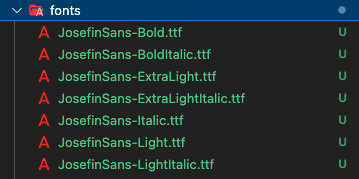
After adding your font files, create a CSS file with multiple @font-face rules that specifies each font you want to use in your app. For example, create a CSS file fonts.css in the root or src folder with the following:
font-family: specifies a name as the font face value for font properties.src: Specifies the resource containing the font data.local(): Utilizes the font-family name. The function determines if the font family is available locally before downloading from the webserver.url(): The file path to the font resource.format(): Provides the browser the format of the font resource. The available types are: woff, woff2, truetype , opentype , embedded-opentype , and svg .font-weight: Provides the browser the font-weight value to the specified font resource.
Note: Font files ending with .ttf utilize the truetype format.
@font-face {
  font-family: 'Josefin Sans';
  src: local('Josefin Sans'), url('../fonts/JosefinSans-Light.ttf') format('truetype');
  font-weight: 300;
}

@font-face {
  font-family: 'Josefin Sans';
  src: local('Josefin Sans'), url('../fonts/JosefinSans-Regular.ttf') format('truetype');
  font-weight: 400;
}

@font-face {
  font-family: 'Josefin Sans';
  src: local('Josefin Sans'), url('../fonts/JosefinSans-Medium.ttf') format('truetype');
  font-weight: 500;
}
After creating the CSS file, import the fonts.css file into your main stylesheet. For example, in index.css :
@import './fonts';

body {
  font-family: 'Josefin Sans', sans-serif;
}
Lastly, ensure to remove all old resources using external font services.
After setting up your app with your own font files, try running measurable analytical tools to test the performance! You can utilize the performance tab in Chrome DevTools or websites such as webpagetest.org . You’d be surprised how big a difference it makes on 3G network connections!